
Crypto Joins Your Books, and Coinbase Is the First Exchange In
Moneyta now keeps crypto the way it keeps everything else: priced daily, counted as its own asset class, and booked from what the exchange actually reports. Coinbase is the first crypto exchange on our verified list. Here is what that means, how conversions, staking rewards and transfers are booked, and what we do not do yet.
For a long time, crypto was the part of people's money that lived somewhere else. A brokerage account in one place, a retirement plan in another, and a few coins on an exchange that never made it into the same picture. We heard the same thing again and again: my net worth is wrong because it leaves out my crypto, and typing it in by hand goes stale the next day.
So we built it properly, against a real Coinbase account, before writing a word of this post. That mattered, because an exchange does not describe your activity the way a brokerage does, and the differences are exactly where a tracker quietly gets your numbers wrong.
What it means that Coinbase is on the verified list
Brokerage sync is in beta, and we only call a connection verified once a real account at that firm has synced and matched its own statement. A verified broker is one you can add to your connections straight away. One that is not verified yet goes to a short review first, so we can check it before your numbers depend on it.
Coinbase is the first crypto exchange to clear that bar. Add it from Connections, sign in through the secure connection window, and your coins arrive on the first sync. Other exchanges can still be requested; they will join the list the same way, one clean sync at a time.
How your coins are priced and counted
- Every coin is priced in dollars every day. The most widely held coins come from our own daily market data; a coin we do not carry yet is valued at the price Coinbase itself reports, and says so.
- Crypto is its own asset class. It gets its own slice in your allocation and its own account in your books, instead of being lumped in with stocks or left in a bucket called other.
- If Coinbase holds the same coin in more than one wallet, you see one holding with the units added up and the cost averaged, not two half-holdings.
- Your books are compared with Coinbase's own statement after every sync, coin by coin. If they ever disagree, you see which coin and by how much, with a button to bring it in line.
One conversion, not two
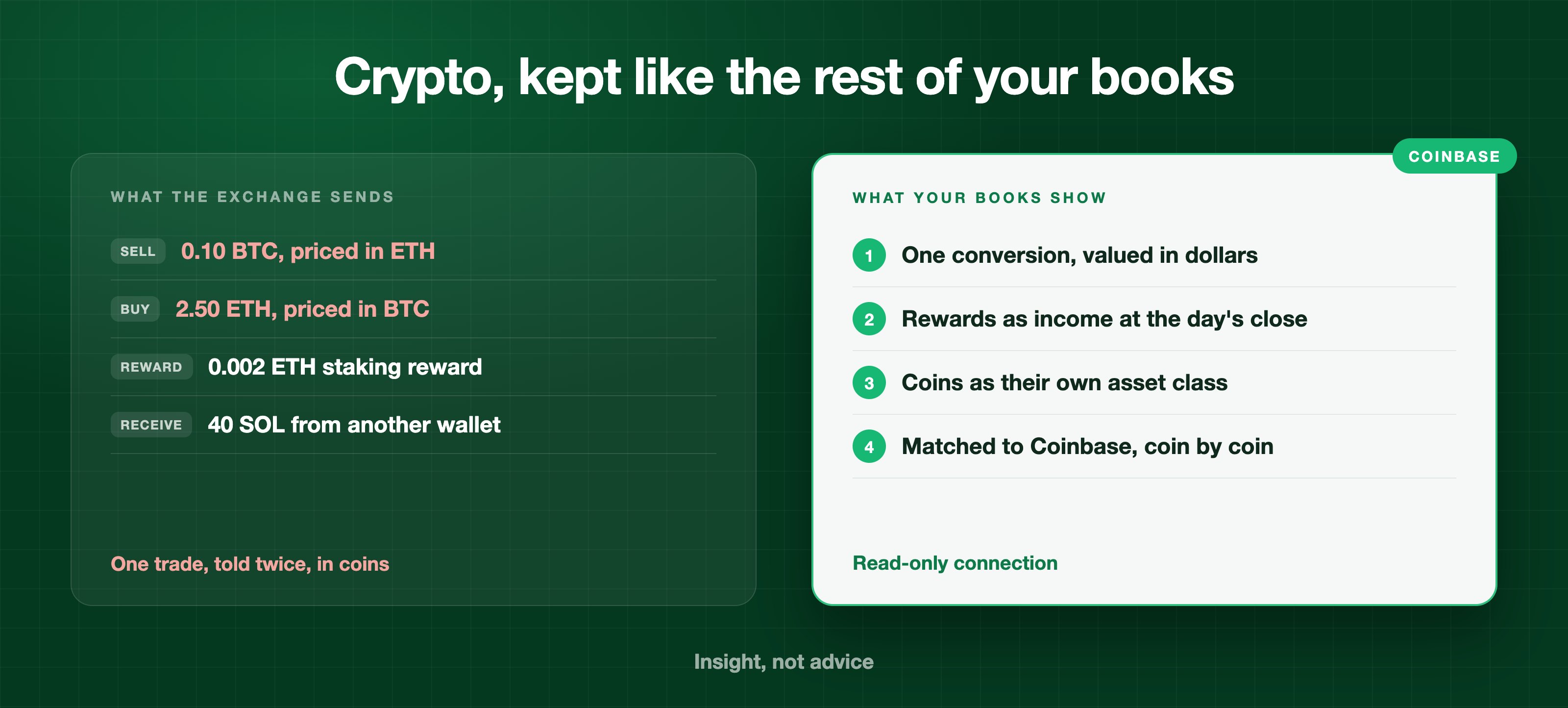
Here is the detail that took the most care. When you convert one coin into another on Coinbase, say bitcoin into ether, Coinbase reports it twice: once as a sale of bitcoin priced in ether, and once as a purchase of ether priced in bitcoin, a second apart, each with its own reference. Read naively, that is two trades, and both coins move twice as far as they really did.
Moneyta recognizes the pair as one conversion. Bitcoin leaves once, ether arrives once, and both sides carry the same dollar value, taken from the latest daily closing price on or before that day, so your cash does not move on a trade where no dollars changed hands. A purchase you paid for with a dollar coin such as USDC is a different shape: that one really is a single row, and the USDC it spent leaves your balance alongside it.
Staking rewards, transfers and interest
- A staking reward is booked as income, in the coin you received, at the latest daily closing price on or before that day. Your holding grows by the reward and your income shows what it was worth when it arrived.
- A coin you move in from another wallet is added at the latest daily closing price on or before that day. A coin you send out leaves at the cost it was carried at, so sending it to yourself never shows up as a gain or a loss.
- Interest, Earn payouts and subscription rebates from Coinbase are booked as cash income.
- Anything we cannot read with confidence is held back, never guessed. A coin price we do not have for that day, a row type Coinbase has not explained, dollars moved as if they were a coin: each waits on your Connections page with a plain reason until it can be booked correctly.
What we do not do yet
We would rather tell you the edges now than have you find them later.
- History before you connect is not replayed trade by trade. Your first sync starts each coin at the amount and cost Coinbase states that day; activity from then on is booked as it happens.
- Coins outside our daily market data are valued at Coinbase's own price, and they do not have a price history chart of their own yet.
- The research desk covers companies and funds, not coins, so a crypto holding does not offer a Research link.
- Coinbase is the only crypto exchange on the verified list today. If you hold coins elsewhere, you can still request your exchange, or add the holdings by hand in the meantime.
Who can use it
Brokerage sync, Coinbase included, is part of the Silver and Gold plans. Gold adds the books: transactions with tax lots, the double entry ledger and the statements, which is where every reward and conversion described above is recorded. On the Free plan you can still type your coins in by hand, and they are counted in your net worth and your allocation.
Put all of it in one picture
If part of your money has been living on an exchange, outside everything else you track, this is the week it can come home. Connect Coinbase, let the first sync run, and look at your whole net worth with the coins in it.
Frequently asked questions
Does Moneyta support crypto?
Yes. Moneyta prices crypto holdings in dollars every day, counts them as their own asset class in allocation and net worth, and can sync them from a connected Coinbase account. Coins can also be added by hand on any plan.
Can I connect Coinbase to Moneyta?
Yes. Coinbase is the first crypto exchange on Moneyta's verified list, so members on a plan with brokerage sync can add it from the Connections page and connect straight away. The connection is read-only.
Can Moneyta move or trade my crypto?
No. The Coinbase connection is read-only. Moneyta can see balances and activity history; it cannot place trades, convert coins or move funds.
How does Moneyta handle a conversion between two coins?
Coinbase reports a conversion as two rows, a sale of one coin and a purchase of the other. Moneyta books them as one conversion: each coin moves once, and both sides carry the same dollar value, from the latest daily closing price on or before that day.
Can I try Coinbase sync on Moneyta without paying?
Yes. Every new Moneyta account starts with 14 days of Gold, which includes brokerage sync and the books, with no credit card required. After the two weeks the account moves to the Free plan with its data kept.
How are staking rewards recorded in Moneyta?
A staking reward is recorded as income in the coin received, valued at the latest daily closing price on or before that day, and the holding grows by the reward. Moneyta does not give tax advice on how rewards are taxed.